
How to Access the Official Login Page
Open Rainbet NZ and select the “Login” button in the top-right corner of the site. We keep this control in the main navigation, so you can sign in without returning to the homepage. The login form opens over the current page and asks for the email address and password linked to your Rainbet account. We recommend saving the official address in your browser bookmarks rather than relying on links from messages, advertisements, or third-party websites.
Check the full domain before entering any account information. Fraudulent pages may replace one letter, add a word, or use a different domain extension while copying our branding. Our team will never request your password through email, social media, messaging services, or an external form. Close any page that requests these details outside rainbet.org.nz. You should then contact us through the support channel published on our website and include the suspicious link without opening it again.
Step-by-Step Rainbet Login Guide
Use the email address and password linked to your Rainbet account. Complete each check in the order shown below so your login request reaches our system through the correct domain.
- Open the Official Website
Enter rainbet.org.nz directly in your browser. Check the spelling and domain extension before opening the login form.
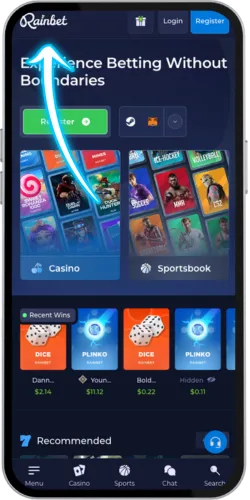
- Click the Login Button
Select the blue “Login” button in the top-right corner. We open the sign-in form on the current page, so you can confirm that the domain remains unchanged.
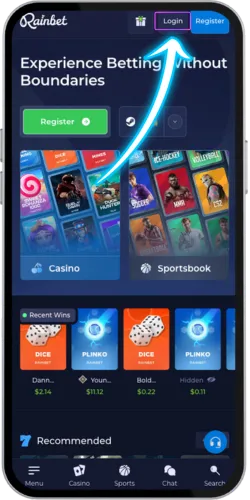
- Enter Your Email
Enter the exact email address used when the account was created. Check for typing errors, spaces, and outdated autofill entries before continuing.
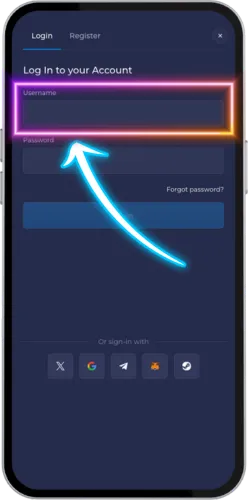
- Input Your Password
Type your password exactly as created. Passwords are case-sensitive, so confirm the Caps Lock setting and remove any spaces inserted by your device.
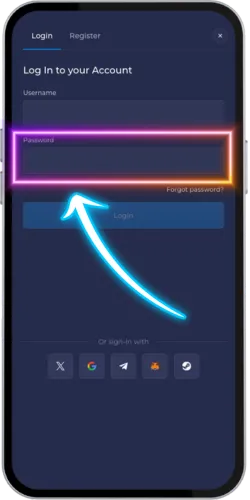
- Access Your Dashboard
Once we confirm the credentials, the account dashboard opens. Check your balance, current promotions, transaction records, and recent account activity before placing a wager or requesting a payment.
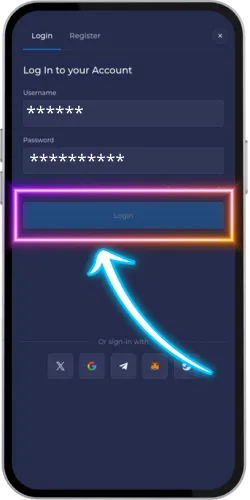
Returning account holders normally need only their registered email address and password. Do not repeat the same password after several failed attempts, since additional submissions may trigger a temporary restriction. Use the password reset option when you are unsure which credentials are current. We may also request a verification code when two-factor authentication is active or when a sign-in differs from your usual account activity.
Common Account Access Issues and Solutions
A failed Rainbet login usually points to an incorrect email address, an outdated saved password, stored browser data, or a temporary connection problem. Start with the simplest checks before changing account information. Confirm the domain, re-enter both fields manually, and test the page through a private browser window. Avoid repeated password attempts when the same error continues. The table below lists the checks we recommend for each login problem and explains when you should contact our support team.
| Issue | Solution |
| Forgot Password | Select the “Forgot Password” link and enter the email registered to your account. Open the most recent reset message and check the spam folder if it is not visible. Reset links expire, so complete the change promptly. The new password must meet the requirements shown on the reset page. |
| Account Locked | Stop submitting the same credentials and wait for the restriction period shown on the screen. Contact our support team when the account remains inaccessible after that period. We may request identity or account checks before restoring access. |
| Browser Cache Issues | Open a private window and try the login page again. If the form works there, clear cookies and cached files for Rainbet, close the browser, and reopen it. On Windows, use Ctrl+Shift+Delete. On macOS, use Cmd+Shift+Delete. |
| Two-Factor Authentication Problems | Set the device date and time to automatic before entering a new authentication code. Each code remains valid for a limited period and should be used once. A stored backup code can be used when the authenticator is unavailable. |
| Email Not Recognized | Check spelling, punctuation, and autofill entries. Enter the address originally used for registration. If the account was created through an external sign-in method, use that same method. Contact us when you cannot identify the registered address. |
Account security: Activate two-factor authentication and store the backup codes separately from your phone. A backup code can restore access when the authenticator is lost, replaced, or unavailable. Never send an authentication code to another person, including anyone claiming to represent Rainbet support.
Security of the Rainbet Login System
We protect Rainbet login requests through encrypted website connections, account verification controls, and monitoring for unusual sign-in activity. Your password should only be entered on our official domain. We do not request it through email, social media, live-chat transcripts, or third-party forms. Our internal controls restrict access to authentication data, and routine maintenance addresses identified software risks. Account protection also depends on the credentials you choose and the devices used to reach the site.
Encrypted HTTPS Connection
Information submitted through the Rainbet sign-in form travels through an encrypted HTTPS connection. Check the browser address bar for the correct domain and a valid connection indicator before entering account details.
Two-Factor Authentication
When two-factor authentication is active, we require a current verification code after the password check. A password alone will not complete the sign-in process on an unverified request.
Login Activity Monitoring
We review sign-in activity that differs from the account’s usual device or location pattern. A verification request or temporary restriction may follow when the activity requires confirmation.
Security Maintenance
Our technical team applies security updates and reviews access controls as part of routine system maintenance. Confirmed risks are assessed before changes are released to the live service.
Create a password that is not used for email, banking, social media, or another betting account. Longer passwords built from unrelated words are harder to guess than short combinations based on names or dates. Keep browser and operating-system updates active, especially on a device used for deposits or withdrawals. Sign out after each session on a shared computer. If you notice an unfamiliar login, change the password, review recent account activity, and contact our support team through rainbet.org.nz.
Benefits of Having a Registered Account
A completed Rainbet login gives you direct access to the tools connected to your account. You can review balances, manage payment details, check betting records, set account limits, and see promotions assigned to your profile. Guest visitors can view parts of the site, but account-based transactions and personal settings require authentication. We keep these functions inside the dashboard so that changes are recorded against the correct account and can be reviewed when a payment or access query arises.

- Game Access: Open the casino and sportsbook products available for your account and location. Individual titles may be restricted by provider rules, account status, or local requirements.
- Promotion Access: View account-based promotions and read the deposit amount, wagering conditions, eligible games, and expiry date before opting in. Guest visitors cannot activate promotions linked to a registered profile.
- Withdrawals and Transactions: Submit withdrawal requests through the cashier and review their current status. Processing time depends on the payment method, account verification, provider checks, and any applicable withdrawal conditions.
- Betting Records: Review open and settled wagers across the casino and sportsbook sections. Transaction records help you compare deposits, withdrawals, stakes, and account balances over a selected period.
- Account Controls: Set deposit limits, session reminders, and communication preferences from your profile. Changes to personal or payment information may require an additional identity check.
- Device Access: Sign in from a supported desktop, phone, or tablet and open the same account balance and records. Always sign out before leaving a shared or public device.
Contact us through the live-chat channel published at our platform when an account function does not work as expected. Our team reviews the account after completing the required security checks and uses the available transaction or contact history to assess the issue. Never include your password, full authentication code, or complete payment credentials in a support message. We will specify which documents or account details are required when verification is necessary.